Anatomy of a SaaS
Week 3 · companion deck · what a product is made of, and who writes each part
AI for Business and FinTech · European School of Economics, Florence
Why this deck
This morning you built a model and judged it. A model is not a product.
Your capstone will be a small product, and in December you will have to say what it is made of, what it costs, and what could go wrong. Today: the parts of any software-as-a-service, who builds each one, and which one you must never hand over.
You will not write most of it. An agent will write some, services will rent you the rest. Your job is to know what each part does — so that you can judge what you are given.
One product, all the way through
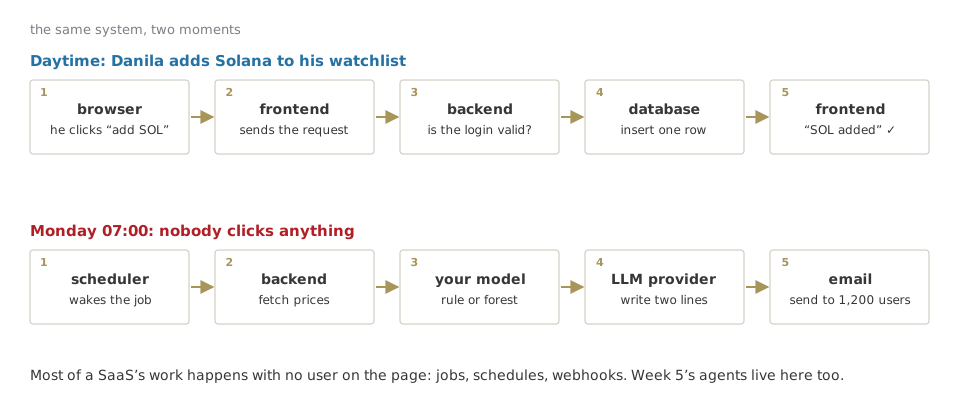
VolAlert — every Monday, an email: is next week going to be rough for what you hold?
What the user sees
- signs up with Google
- picks the assets they follow
- pays €9 a month after a free month
- every Monday at 7:00, an email: “SOL: high-volatility week likely (0.71). ETH: calm.” plus two lines of explanation
What we already have
- the rule and the forest from this morning
- an LLM that can write two lines, from code
What we do not have
everything else. That is this deck.
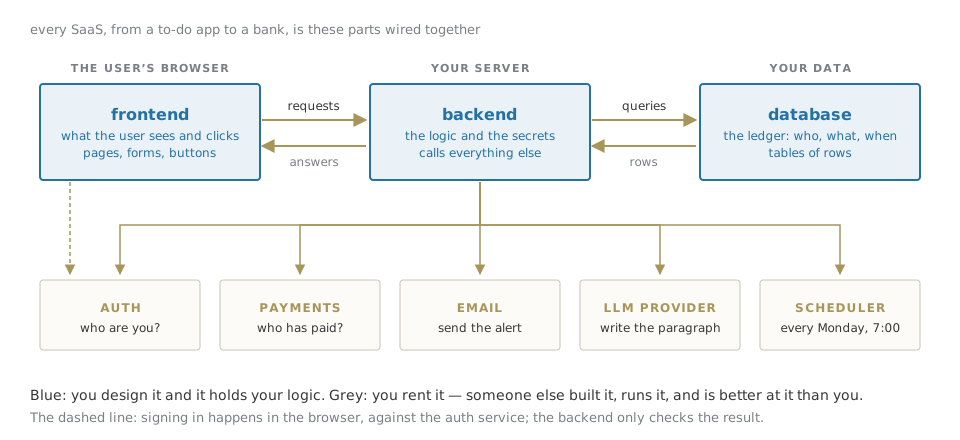
A SaaS is a few parts you write and many parts you rent.
The skill is not building every part. It is knowing which part is yours.
The map
The same system, two moments
Part 1 The parts you write
Frontend — the shop window
Everything the user sees and clicks: pages, forms, buttons, the chart of their watchlist.
It runs in the user’s browser, on their machine — not on yours. You send it once; it runs there.
Today it is usually written in React, most often with Next.js. Builders like v0 and Lovable produce exactly this part.
The one rule
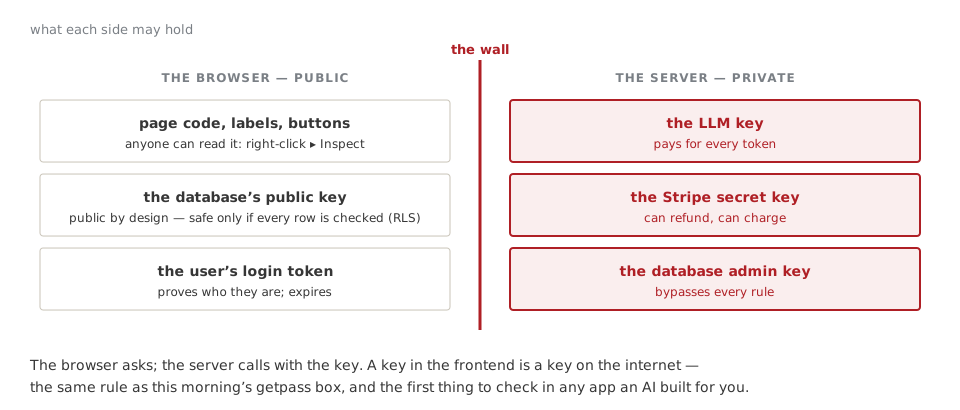
Anything in the frontend is public. Anyone can right-click ▸ Inspect and read it — including any key you were careless enough to put there.
Backend — the back office
The logic and the secrets. It runs on a server you control (or rent).
It decides who may do what, calls the database, calls the LLM, sends the emails, charges the card. In VolAlert, it is also where this morning’s model runs every Monday.
Written in anything: Python (FastAPI) for us; JavaScript in the same Next.js project; small functions that run only when called.
A useful test. For every feature, ask: could a user cheat if this ran in their browser?
“Is this person a paying customer?” — backend.
“Which colour is the button?” — frontend.
Where the keys live
Database — the ledger
Where everything that must be remembered lives: users, their watchlists, every alert sent, every payment.
Almost always Postgres today: tables of rows, queried with SQL.
Why not a spreadsheet? Because a thousand users write to it at the same time; because a payment and its alert must be saved together or not at all; because the database can enforce rules a spreadsheet cannot.
You design the tables. That is a product decision, not a technical one: what you can ask later depends on what you store now.
Row-level security: the rule the database checks itself
watchlists |
user_id | asset | added |
|---|---|---|---|
| danila | SOL-USD | 7 Oct | |
| maria | BTC-USD | 2 Oct | |
| danila | ETH-USD | 1 Oct |
Rule written once, in the database: a user may read only the rows where user_id is theirs. Now even if the frontend asks for everything, Danila gets two rows and never sees Maria’s.
In 2025 security researchers found many apps generated by AI builders with this rule switched off: every user’s data, readable by anyone with the public key. The app looked finished. The first question to ask of any AI-built app: is row-level security on, on every table?
Part 2 The parts you rent
Auth — who are you, and what may you do
Two different questions:
- authentication — who are you? Password, a magic link by email, “Sign in with Google”, a second factor.
- authorization — what may you do? Read your own watchlist, not Maria’s. Use the paid features only if you paid.
Never build the first one yourself. Password storage, resets, Google sign-in, MFA, account takeover: it is a speciality, and the services are better at it than any team you will hire.
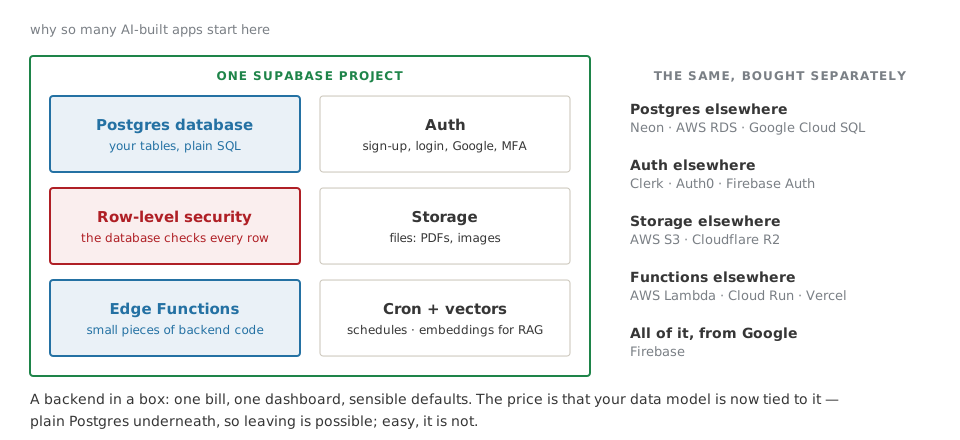
Supabase Auth · Clerk · Auth0 · Firebase Auth.
The second one is yours. Who may see what is your business rule — written in the backend and in row-level security.
Supabase, opened
The rest of the rent list
| you need to… | rent it from | why not build it |
|---|---|---|
| take payments, monthly | Stripe; Paddle or Lemon Squeezy if you want them to handle EU VAT for you | cards, fraud, refunds, invoices, tax |
| send email | Resend · Postmark · Amazon SES | landing in the inbox, not in spam, is a craft |
| know what users do | PostHog · Google Analytics | — |
| know when it breaks | Sentry | you will not be watching at 3 a.m. |
| run things on a schedule | Supabase Cron · Vercel Cron · GitHub Actions | — |
Each is a few lines of code in your backend and a key in your settings. Each is also a company that now holds some of your users’ data — which is a GDPR question, not a technical one.
The LLM provider
Directly from who trains the model: Anthropic, OpenAI, Google. What you did this morning.
Through your cloud: Claude and others on AWS Bedrock, Google Vertex AI, Microsoft Azure. Same models, billed on the cloud account you already have, with its contracts and its EU regions.
Three rules, whichever you pick:
- called only from the backend — the key never leaves the server;
- every call logged: tokens in, tokens out, cost — this morning’s
USAGE; - the cost per user per month written down before you set the price. If two lines of explanation cost more than the €9, the product does not exist. (Week 5.)
Part 3 Where it runs
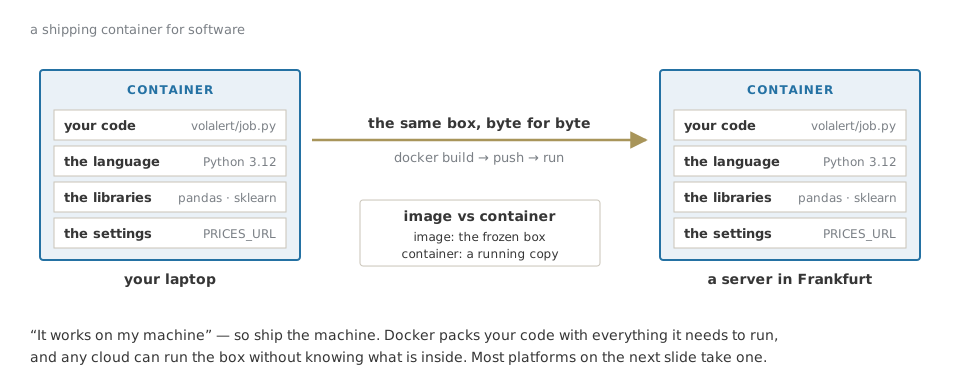
Docker — ship the machine
Three ways to rent a place to run
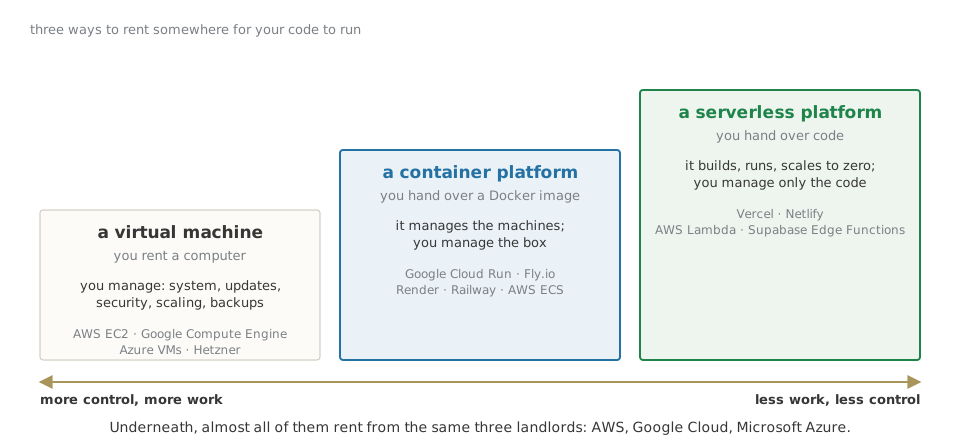
The landlords
AWS, Google Cloud, Microsoft Azure. Vercel, Supabase, Render and most of the names in this deck are, underneath, renting from them — and adding the part that makes it easy.
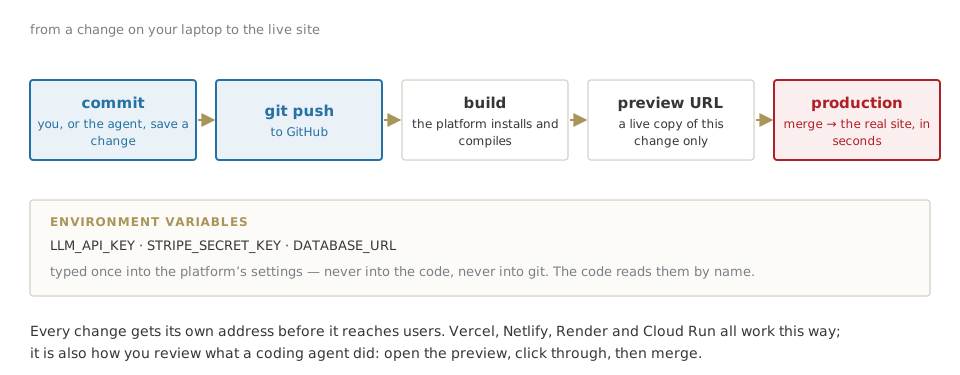
Deploy — from a change to the live site
VolAlert, with a name on every box
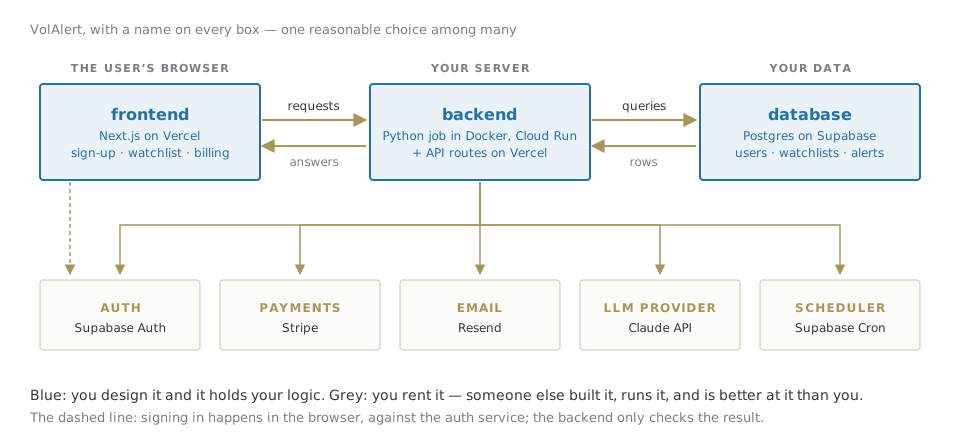
Why a separate Python job for the model? Because the forest needs pandas and scikit-learn, and a Docker image on Cloud Run is the simplest place for them. Everything else stays in the Next.js project on Vercel and in Supabase.
Part 4 Who writes the code
The code can now be written by a model. The decisions cannot.
Which raises two questions: what exactly is the thing writing it — and how much of the product should you let it write?
Model, harness, your world
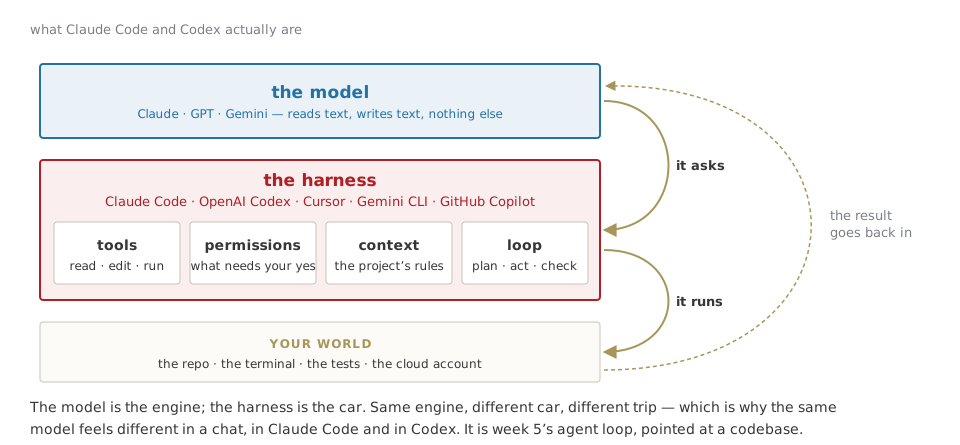
What the harness adds — and why it matters to you
| what it is | why you care | |
|---|---|---|
| tools | read files, edit them, run commands, search | it can test what it wrote — or delete what it should not |
| permissions | which actions need your yes | the difference between an assistant and an incident |
| context | a rules file in the repo: CLAUDE.md, AGENTS.md |
your conventions, written once, read every time |
| sandbox | where it runs: your laptop, a container, the cloud | what it can reach if it goes wrong |
| loop | plan → act → check the result → again | it can work for an hour unattended — check what it did, not what it says it did |
Claude Code and Codex are harnesses: the same idea, from Anthropic and OpenAI. Cursor and GitHub Copilot put one inside an editor. The model inside can often be swapped; the habits you build around it cannot.
From a sentence to a codebase
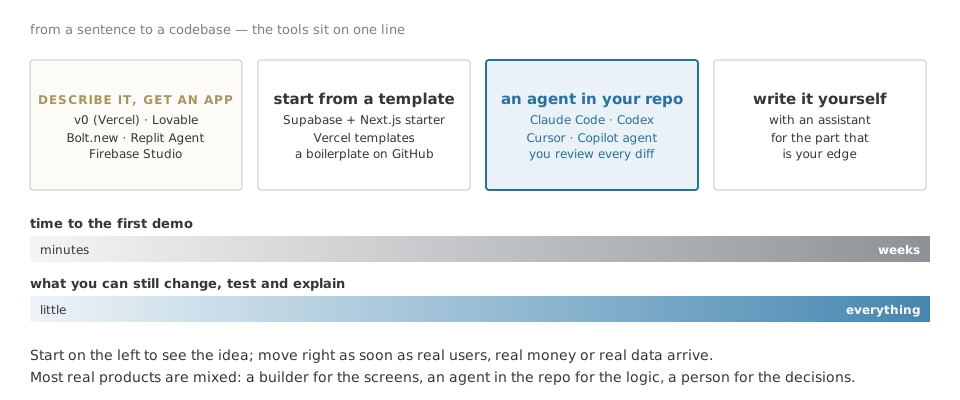
What the builders do well, and where they stop
v0, Lovable, Bolt, Replit — in minutes:
- the screens, good-looking, responsive;
- a Supabase project wired in, with auth;
- a live URL to show an investor or a user on Friday.
That is real value: an idea you can click beats a slide.
What is still yours, and they will not tell you is missing:
- row-level security on every table;
- what happens when a payment fails halfway;
- the model inside: base rate, honest test, cost per user;
- logs, alerts, backups;
- GDPR, and the AI Act for the LLM part.
The demo is the first 80% of the look and the first 20% of the work.
What stays yours
- The question — what the product decides, and for whom. (This morning: direction or volatility.)
- The data — what you store, where, for how long, and who may read which row.
- The test — base rate, honest split, the rule to beat; for an LLM, the same dates and the same score.
- The money — price per user against cost per user, written before launch.
- The checklist — keys on the server, row-level security on, every change through a preview.
Everything else can be generated, rented or delegated. These five are what makes it your product — and what the capstone is graded on.
Your turn
PAPER · ten minutes
Take your capstone idea, or VolAlert if you have none yet.
- Draw the map: frontend, backend, database, and the rented boxes you need.
- On each box, write one name — a service you would use — and who builds it: you, an agent, a builder, a vendor.
- Mark in red the one box where a mistake would cost the most. That is where your review goes.
Three sentences to keep
A SaaS is a few parts you write and many you rent; the secrets live on the server.
Docker ships the machine; platforms run it for you; the cloud landlords are underneath.
Builders and agents write the code; the question, the data, the test and the money stay yours.
AI for Business & FinTech · ESE Florence